26 May 2026 - Non-Consecutive Activity Scheduling
Release Date: May 26, 2026
Flexible Activity Scheduling Is Here
Section titled “Flexible Activity Scheduling Is Here”You can now schedule activities on non-consecutive days.
Until now, activity scheduling was built around one continuous date range by default. That meant you had to work around rest days to build the right schedule.
With this update, you can choose the exact activity days you want from the start, so setting up training days, split sessions, or other irregular schedules is much faster.
Updates in This Release
Section titled “Updates in This Release”- Flexible activity day scheduling: pick exact days instead of one continuous range.
- Length-of-stay accommodation pricing: automatically apply a discount after a set number of nights.
- Webshop surcharges in checkout: surcharges set on your payment page are now included automatically.
Flexible Activity Day Scheduling
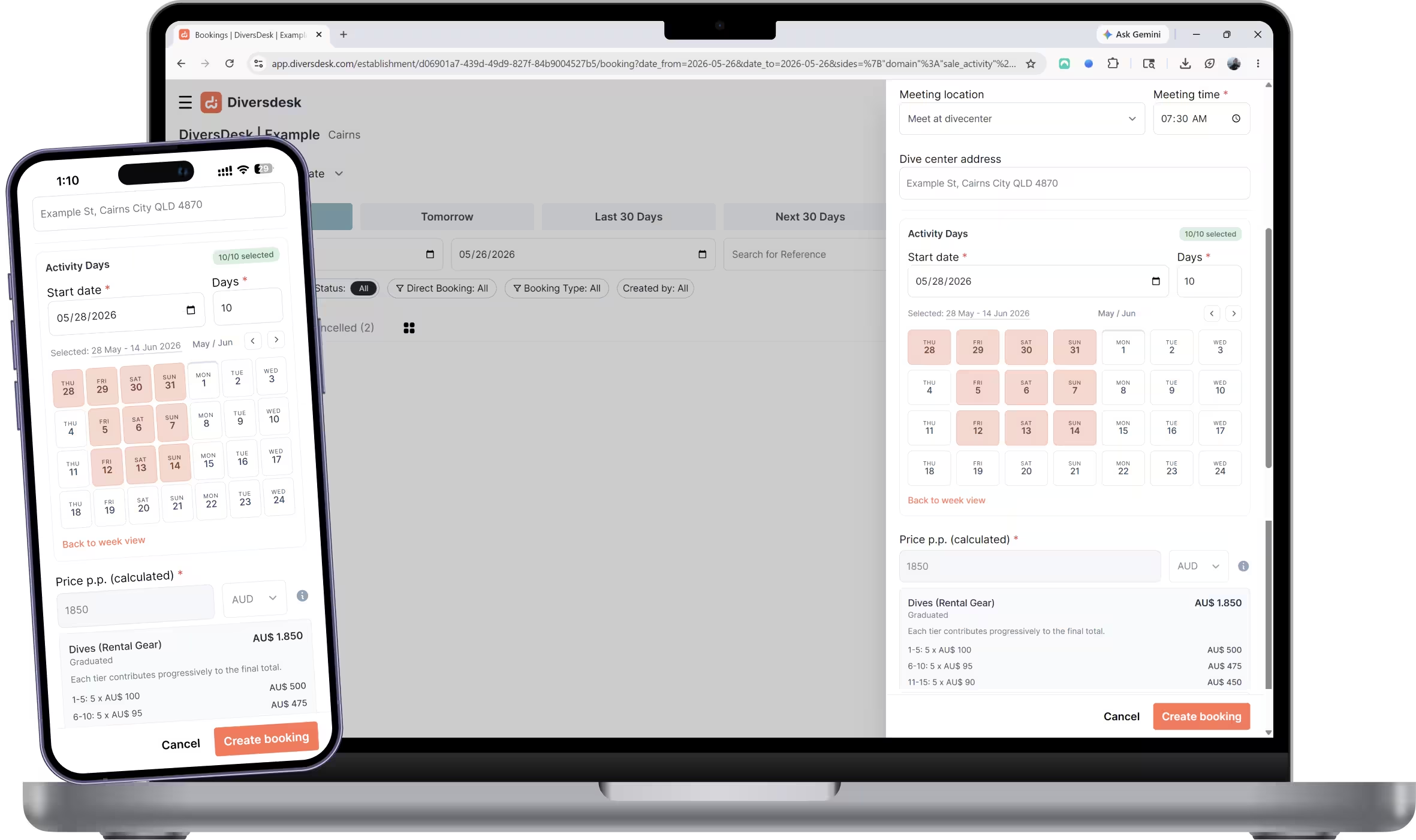
Section titled “Flexible Activity Day Scheduling”When you create an activity, the start date selector has been replaced by a new Activity Days section. You still pick a start date and the days are taken over from the selected activity as before, but now the days are shown as individual day cards.
By default those cards are set to consecutive days. The difference is that you can now simply deselect any day you don’t need, or move days around, in a single step while creating the activity. No more need to schedule rest days just to break up a multi-day activity.
The schedule type is reflected on booking cards with a clear label, and the activity detail side panel shows grouped date ranges so it is easy to see the full picture at a glance.
Length-of-Stay Accommodation Pricing
Section titled “Length-of-Stay Accommodation Pricing”You can now add an additional price rule to accommodation based on the total length of stay. This makes it straightforward to reward longer bookings with an automatic discount after a certain number of nights, without any manual adjustments.
The rule is set once on the accommodation pricing page and applies automatically when the stay meets the threshold.
Webshop Surcharges in Checkout
Section titled “Webshop Surcharges in Checkout”Surcharges configured on your payment page are now automatically included in the webshop checkout total. Previously these had to be accounted for separately. Guests will now always see the correct final amount during the booking flow, keeping pricing consistent across all channels.