Pricing
Use the Pricing page to quickly manage activity pricing from one place. You can set up and maintain activities and add-ons, use fixed prices for standard offers, and create tiered rates for offers whose price changes with the number of dives or days.
If you prefer a more visual way to edit activities, you can also manage them directly from the Activities Webshop in manager view.
Fixed Prices
Section titled “Fixed Prices”Fixed pricing is the standard setup for many dive centers. Create a set of activities with a fixed per-person price, then add those activities to bookings and connect guests to the activities they are participating in.
The number of dives and the duration are set when you create the activity. You can adjust them later inside a booking for planning purposes, but this does not automatically update the activity price. The price only changes when the number of participating guests changes, or when you apply another price adjustment such as a discount.
When a guest needs to join the same or a different activity on another day, add the appropriate activity to the booking instead of expecting a duration change to create another scheduled activity.
Tiered Rates
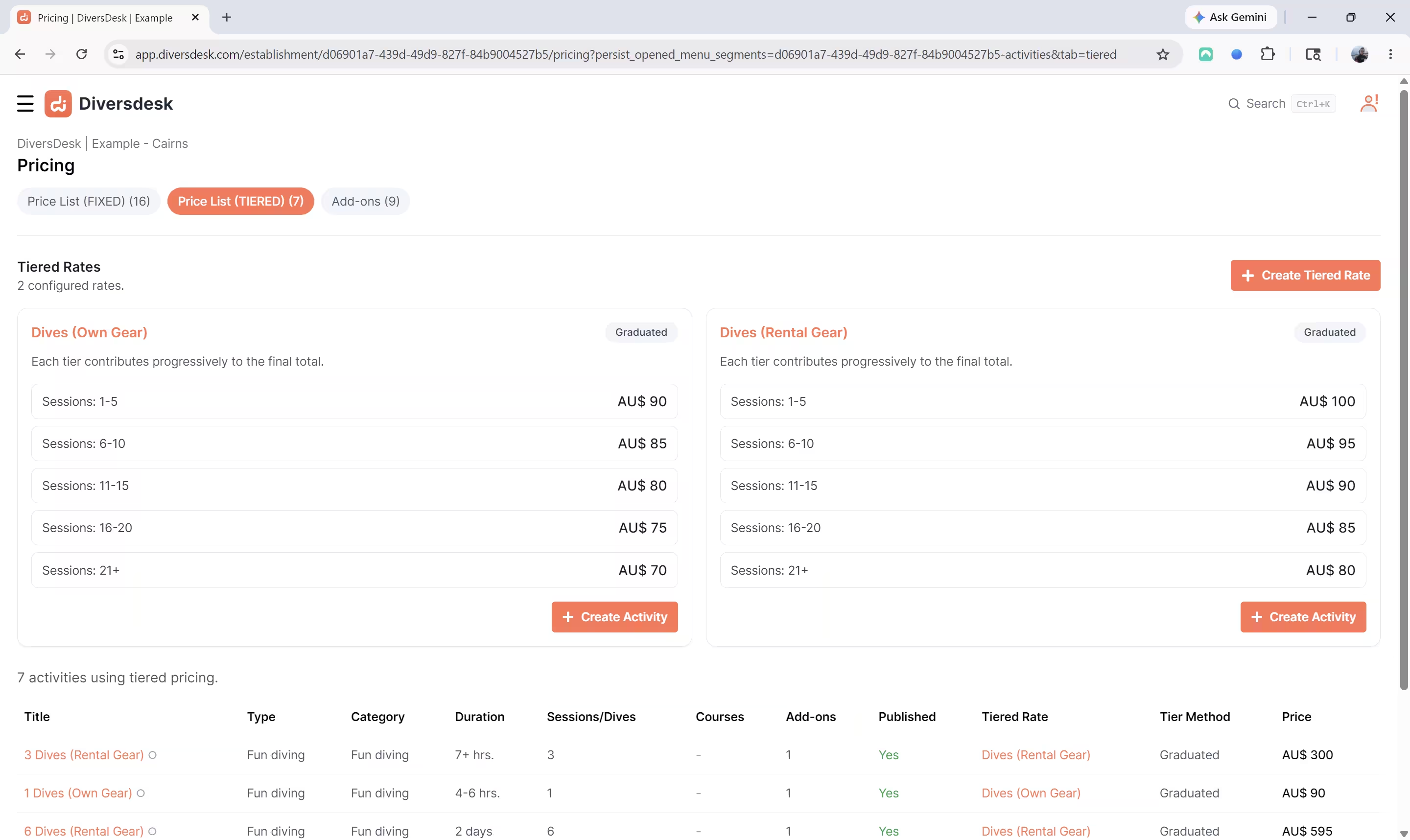
Section titled “Tiered Rates”Use Tiered Rates to create a per-dive or per-session rate that can change as the number of dives increases. Tiered activities are especially useful for guests staying at your accommodation for a period of time who decide which days to dive during their stay. Their booking can remain on one activity card while you adjust the number of dives or days as their plans develop.
Tiered rates can be configured as:
- Volume pricing: All sessions use the price from the highest matching tier.
- Graduated pricing: Each tier contributes progressively to the final total.
The tier list defines the entry levels that customers can select in the webshop and that your team commonly uses when creating bookings, such as two dives per day or three dives per day. You do not need a separate activity for every possible package variation.
When you increase the number of dives on a tiered activity, Diversdesk applies the matching tier automatically and updates the generated title to include the dive count, for example 6 Fun Dives.
Use the daily multiplier when dives should stay proportional to the number of activity days. For example, a two-dives-per-day activity becomes six dives when you set it to three days. Changing the days updates the dive count and recalculates the price. Use the flexible option when you need to choose the dive count independently of the number of days.
Choosing a Pricing Method
Section titled “Choosing a Pricing Method”Choose Fixed Prices when you sell standard activities at a set per-person price and changes to duration or dives are only operational adjustments.
Choose Tiered Rates when the price should respond to the number of dives or days. This can substantially reduce the number of similar activities you need to maintain.
For the full booking workflow, including adding a tiered activity, changing dives, and using the daily multiplier, read Managing Tiered Activities.